Monday, February 10, 2025

Practiced


Arrays: 
1. `push()` 2. `pop()` 3. `shift()` 4. `unshift()` 5. `splice()`
6. `slice()` 7. `concat()` 8. `indexOf()` 9. `includes()` 10. `forEach()`
11. `map()` 12. `filter()` 13. `reduce()` 14. `find()` 15. `sort()`
 16. `reverse()` 17. `join()` 18. `some()` 19. `every()` 20. `findIndex()`
21. `fill()` 22. `copyWithin()` 23. `flat()` 24. `flatMap()` 25. `at()`

Array Methods
--------------------------------------------------------------------------
push() - Adds one or more elements to the end of an array and returns          the new length of the array.
##### Solution:
let fruits = ["Apple", "Banana"];
fruits.push("Cherry");
        // ["Apple", "Banana", "Cherry"]
--------------------------------------------------------------------------
pop() -Removes the lastElement from an array and returns that element.
##### Solution:
fruits.pop();
         // ["Apple", "Banana"]
--------------------------------------------------------------------------
shift() -Removes the 1st element from an arr and returns that element.
##### Solution:
fruits.shift();
        // ["Banana"]
--------------------------------------------------------------------------
unshift() - Adds one or more elements to the beginning of an            array and returns the new length of the array.
##### Solution:
fruits.unshift("Apricot");
        // ["Apricot", "Apple", "Banana"]
--------------------------------------------------------------------------
splice(start, deleteCount, item1, item2, ...) - Changes the         contents of an array by removing or replacing existing         elements and/or adding new elements.
##### Solution:
fruits.splice(1, 1, "Blueberry");
        // ["Apple", "Blueberry", "Cherry"]
--------------------------------------------------------------------------
slice(begin, end) - Returns a shallow copy of a portion of an                     array into a new array object.
##### Solution:
let newFruits = fruits.slice(1, 2);
             // ["Blueberry"]
--------------------------------------------------------------------------
concat() - Merges two or more arrays and returns a new array.
##### Solution:
let moreFruits = ["Date", "Elderberry"];
let allFruits = fruits.concat(moreFruits);           // ["Apple", "Blueberry", "Cherry", "Date", "Elderberry"]
--------------------------------------------------------------------------
indexOf(searchElement) - Returns the first index at which a             given element can be found in the array, or -1                if it is not present.
##### Solution:
let index = fruits.indexOf("Blueberry");
                // 1
--------------------------------------------------------------------------
includes(searchElement) - Determines whether an array contains a                         certain element, returning true or false.
##### Solution:
let hasBanana = fruits.includes("Banana");                 // false
--------------------------------------------------------------------------
forEach(callback) - Executes a provided function once for each array element.
##### Solution:
fruits.forEach(fruit => {
    console.log(fruit);
});
--------------------------------------------------------------------------
map(callback) - Creates a new array populated with the results of             calling a provided function on every element in the array.
##### Solution:
let upperCaseFruits = fruits.map(fruit => fruit.toUpperCase());                     // ["APPLE", "BLUEBERRY", "CHERRY"]
--------------------------------------------------------------------------
filter(callback) - Creates a new array with all elements that pass                 the test implemented by the provided function.
##### Solution:
let longNameFruits = fruits.filter(fruit => fruit.length > 5);                      // ["Blueberry"]
--------------------------------------------------------------------------
reduce(callback, initialValue) - Executes a reducer function on         each element of the array, resulting in a single output value.
##### Solution:
let totalLength = fruits.reduce((sum, fruit) => sum + fruit.length, 0);                     // 19
--------------------------------------------------------------------------
find(callback) - Returns the value of the first element in the array                  that satisfies the provided testing function.
##### Solution:
let firstLongNameFruit = fruits.find(fruit => fruit.length > 5);                 // "Blueberry"
--------------------------------------------------------------------------
sort(compareFunction) - Sorts the elements of an array in place                         and returns the array.
##### Solution:
fruits.sort();     // ["Apple", "Blueberry", "Cherry"]
reverse() - Reverses the order of the elements in an
            array in place.

##### Solution:
let fruits = ["Apple", "Banana", "Cherry"];
fruits.reverse();
// ["Cherry", "Banana", "Apple"]


join(separator) - Joins all elements of an array into a string
       and separates each element with the specified separator.
##### Solution:
let fruitsString = fruits.join(", ");
      // "Cherry, Banana, Apple"


some(callback) - Tests whether at least one element in the
      array passes the test implemented by the provided function.
##### Solution:
let hasLongName = fruits.some(fruit => fruit.length > 6);
                // true


every(callback) - Tests whether all elements in the array
        pass the test implemented by the provided function.
##### Solution:
let allHaveLongNames = fruits.every(fruit => fruit.length > 3);
                          // true


findIndex(callback) - Returns the index of the first element
    in the array that satisfies the provided testing function.
                                Otherwise, it returns -1.
##### Solution:
let index = fruits.findIndex(fruit => fruit.length > 5);
                      // 0


fill(value, start, end) - Fills all the elements of an array
      from a start index to an end index with a static value.
##### Solution:
fruits.fill("Kiwi", 1, 2);
        // ["Cherry", "Kiwi", "Apple"]

copyWithin(target, start, end) - Shallow copies part of an array
         to another location in the same array and returns it,
           without modifying its length.
##### Solution:
let arr = ["A", "B", "C", "D"];
arr.copyWithin(1, 2, 4);
        // ["A", "C", "D", "D"]

flat(depth) - Creates a new array with all sub-array elements
              concatenated into it recursively up to
                the specified depth.
##### Solution:
let nestedArr = [1, [2, [3, 4], 5], 6];
let flatArr = nestedArr.flat(2);
          // [1, 2, 3, 4, 5, 6]

flatMap(callback) - First maps each element using a
              mapping function, then flattens the
               result into a new array.
##### Solution:
let numbers = [1, 2, 3];
let doubled = numbers.flatMap(num => [num, num * 2]);
// [1, 2, 2, 4, 3, 6]

at(index) - Returns the element at the given index.
            It accepts negative integers, which count
               back from the last item.
##### Solution:
let arr = [1, 2, 3, 4];
let element = arr.at(-1);
// 4
Example
Reduce====

 Sum of Array Elements

Calculate the sum of all elements in an array:

javascript
let numbers = [1, 2, 3, 4, 5];

let sum = numbers.reduce((acc, value) => {
    return acc + value;
}, 0); // Initial value of the accumulator is 0

console.log(sum); // Output: 15

2. Flatten an Array of Arrays

Flatten a nested array into a single array:

javascript
let nestedArray = [[1, 2], [3, 4], [5, 6]];

let flattenedArray = nestedArray.reduce((acc, value) => {
    return acc.concat(value);
}, []); // Initial value of the accumulator is an empty array

console.log(flattenedArray); // Output: [1, 2, 3, 4, 5, 6]

3. Count Occurrences of Elements

Count the occurrences of each element in an array:

javascript
let elements = ['a', 'b', 'a', 'c', 'b', 'a'];

let occurrences = elements.reduce((acc, value) => {
    acc[value] = (acc[value] || 0) + 1;
    return acc;
}, {}); // Initial value of the accumulator is an empty object

console.log(occurrences); // Output: { a: 3, b: 2, c: 1 }

4. Group Objects by Property

Group an array of objects by a specific property:

javascript
let people = [
    { name: 'Alice', age: 25 },
    { name: 'Bob', age: 30 },
    { name: 'Charlie', age: 25 }
];

let groupedByAge = people.reduce((acc, person) => {
    if (!acc[person.age]) {
        acc[person.age] = [];
    }
    acc[person.age].push(person);
    return acc;
}, {}); // Initial value of the accumulator is an empty object

console.log(groupedByAge);
// Output: { 25: [{ name: 'Alice', age: 25 }, { name: 'Charlie', age: 25 }], 30: [{ name: 'Bob', age: 30 }] }

5. Calculate Product of Array Elements

Calculate the product of all elements in an array:

javascript
let numbers = [1, 2, 3, 4, 5];

let product = numbers.reduce((acc, value) => {
    return acc * value;
}, 1); // Initial value of the accumulator is 1

console.log(product); // Output: 120

6. Remove Duplicates from an Array

Remove duplicates from an array:

javascript
let numbers = [1, 2, 3, 2, 4, 3, 5];

let uniqueNumbers = numbers.reduce((acc, value) => {
    if (!acc.includes(value)) {
        acc.push(value);
    }
    return acc;
}, []); // Initial value of the accumulator is an empty array

console.log(uniqueNumbers); // Output: [1, 2, 3, 4, 5]

These examples demonstrate the flexibility and power of the reduce method in JavaScript. If you have any more specific scenarios or questions, feel free to ask!


---------------------------------------------FUNCTIONS------------------------------------------------- 
     1. Callback Function :
                       function myName(name){                               console.log("hello "+name)
                        }    
                       function showName(callback){
                               const nameValue="maheshh";
                               return callback(nameValue);
                        }
                       showName(myName)

OUTPUT: hello maheshh

Example 2:callback
function showMessageAfterDelay(message, delay, callback) {
setTimeout(function() {
console.log(message);
callback();
}, delay);
}
function completionMessage() {
console.log('The message has been displayed, and this is the completion callback.');
}
// Usage
showMessageAfterDelay('This is the main message.', 3000, completionMessage);
This is the main message.
The message has been displayed, and this is the completion callback.


   2.Higher order function 
                        function addition(callback){
                    return function(x,y){
                    return callback(x,y);
                   }
                  }
            const nums=addition((a,b)=>a+b);
            nums(10,3)
        output: 13

Q3: Lexical Scope, Global Scope, Local Scope:
Lexical Scope
Lexical scope allows a function to access variables
declared in its outer scope. This is determined by where
the function is written in the code, not by where it is called.

Global Scope
Global scope refers to variables declared at the topmost level
of the file, outside of any functions. These variables
can be accessed from anywhere in the file.

Local Scope
Local scope refers to variables declared inside a function.
Variables in this scope are only accessible within the function
in which they are declared.
//Global Scope:The outermost scope,contains everything defined   at the top level.
function outerFunction() {
        // Local Scope of outerFunction: Variables declared here are     accessible only within outerFunction and its nested functions
        const outerVariable = 'I am outside!';

  function middleFunction() {
        // Local Scope of middleFunction: Variables declared here are accessible only within middleFunction and its nested functions
        const middleVariable = 'I am in the middle!';
       
    function innerFunction() {
        // Local Scope of innerFunction: Variables declared here
            are accessible only within innerFunction
        const innerVariable = 'I am inside!';
        console.log(outerVariable); //Accessible due to Lexical Scope
        console.log(middleVariable); //Accessible due to Lexical Scope
        console.log(innerVariable); //Accessible within its own local scope
        }
        innerFunction();
    }
    middleFunction();
}
outerFunction();


Q.x Functions##################

Functions in javascript are reusable block of code to perform some tasks.
functions are easy to read, access, build and maintain.
1.Named Function: A function with a name that you can call by its name.
2.Anonymous Function: A function without a name, often used as an argument to other functions.
3.Arrow Function: A shorter syntax for writing functions introduced in ES6.
4.Immediately Invoked Function Expression (IIFE): A function that runs as soon as it is defined.
5.Higher-Order Function: A function that takes another function as an argument or returns a function.
6.Async Function: A function that works with asynchronous code, often using await

                                    Named Function: function greet() {
    console.log("Hello, World!");
}
greet();  // Output: Hello, World!
----------------------------------------------------------------------------
                                      Anonymous Function
const greet = function() {
    console.log("Hello, World!");
};
greet();  // Output: Hello, World!
----------------------------------------------------------------------------
                                        Arrow Function
const greet = () => {
    console.log("Hello, World!");
};
greet();  // Output: Hello, World!
----------------------------------------------------------------------------
                                            IIFE
(function() {
    console.log("Hello, World!");
})();  // Output: Hello, World!
----------------------------------------------------------------------------
                                             HOF
function higherOrderFunction(fn) {
    return function() {
        return fn() + " and beyond!";
    };
}
const greet = () => "To infinity";
const result = higherOrderFunction(greet)();
console.log(result);  // Output: To infinity and beyond!
----------------------------------------------------------------------------
                                Async await function
async function fetchData() {
    let response = await fetch("https://api.example.com/data");
    let data = await response.json();
    console.log(data);
}
fetchData();
----------------------------------------------------------------------------


1.Check for Prime Numbers: Filters the prime numbers from the input array.
2.Remove Duplicates: Uses reduce to create an array with unique prime values.
3.Count Duplicates: Tracks how many times each prime number appears.
4.Filter Only Duplicates: Extracts prime numbers that appear more than once.
5.Convert Array to Object: Maps duplicate primes into an object with indices as keys.
6.Find 2nd Largest and 2nd Smallest: Determines the second smallest and largest prime numbers.

// Function to Check if a Number is Prime
function isPrime(num) {
  if (num <= 1) return false; // Numbers <= 1 are not prime
  if (num <= 2) return true; // 2 is a prime number
  for (let i = 2; i <= Math.sqrt(num); i++) {
    if (num % i === 0) return false; // If divisible, not prime
  }
  return true; // Prime number
}

// Function to Filter Prime Numbers from an Array
function checkPrime(arr) {
  return arr.filter(item => isPrime(item));
}

// Input Array
let arr = [1, 2, 3, 4, 5, 2, 3, 4, 5, 7, 9, 9, 11, 13, 13, 16, 19, 19, 23, 23, 26, 26, 29, 31, 7, 7];

// Step 1: Get All Prime Numbers in the Array
let primes = checkPrime(arr);
console.log(primes);
// Output: [2, 3, 5, 2, 3, 5, 7, 11, 13, 13, 19, 19, 23, 23, 29, 31, 7, 7]

// Step 2: Remove Duplicates from the Primes Array
let uniquePrimes = primes.reduce((acc, val) => {
  if (!acc.includes(val)) {
    acc.push(val); // Add only unique values
  }
  return acc;
}, []);
console.log(uniquePrimes);
// Output: [2, 3, 5, 7, 11, 13, 19, 23, 29, 31]

// Step 3: Count the Occurrences of Each Prime Number
let countDuplicates = primes.reduce((acc, val) => {
  acc[val] = (acc[val] || 0) + 1; // Increment the count
  return acc;
}, {});
console.log(countDuplicates);
// Output: {"2": 2, "3": 2, "5": 2, "7": 3, "11": 1, "13": 2, "19": 2, "23": 2, "29": 1, "31": 1}

// Step 4: Extract Only Prime Numbers with Duplicates
let duplicatePrimes = Object.keys(countDuplicates)
  .filter(item => countDuplicates[item] > 1)
  .map(res => +res); // Convert keys back to numbers
console.log(duplicatePrimes);
// Output: [2, 3, 5, 7, 13, 19, 23]

// Step 5: Convert Duplicate Primes Array to an Object
let duplicatePrimesObject = duplicatePrimes.reduce((acc, val, index) => {
  acc[index] = val;
  return acc;
}, {});
console.log(duplicatePrimesObject);
// Output: {0: 2, 1: 3, 2: 5, 3: 7, 4: 13, 5: 19, 6: 23}

// Step 6: Find the 2nd Largest and 2nd Smallest Prime Numbers
let secondLargestIndex = duplicatePrimes.indexOf(Math.max(...duplicatePrimes)) - 1; // 2nd Largest
let secondSmallestIndex = duplicatePrimes.indexOf(Math.min(...duplicatePrimes)) + 1; // 2nd Smallest
let secondMaxMinVals = [
  [...duplicatePrimes],
  duplicatePrimes[secondSmallestIndex],
  duplicatePrimes[secondLargestIndex]
];
console.log(secondMaxMinVals);
// Output: [[2, 3, 5, 7, 13, 19, 23], 3, 19]


Thursday, January 23, 2025

code

  • Local Storage: Data stored with no expiration time. The data persists even when the browser is closed and reopened.
    Session Storage: Data that is only available for the duration of the page session. It is cleared when the page session ends, which typically happens when the browser or tab is closed.

    localStorage.setItem('key', 'value');
    sessionStorage.setItem('key', 'value');
    let value = localStorage.getItem('key');
    console.log(value);  // Output: value
    
    let value = sessionStorage.getItem('key');
    console.log(value);  // Output: value
    localStorage.removeItem('key');//To remove an item from local storage:
    sessionStorage.removeItem('key');
    localStorage.clear();//to clear all items from local storage:
    
    sessionStorage.clear();

    ----

  • What it is: Authentication is the process of verifying the identity of a user or entity.
    passwords

  • What it is: Authorization is the process of determining what an authenticated user is allowed to do.
    Purpose: To ensure that the user has permission to access specific resources or perform specific actions.
    Authentication:
     Showing your ticket at the entrance to prove you are a valid attendee.
    Authorization: Accessing different areas of the venue (e.g., general seating, VIP lounge) based on the permissions granted by your ticket.


  •  palindrome


    features of react
    Virtual DOM:
    Component-Based Architecture
    JSX (JavaScript XML
    One-Way Data Binding
    State Management
    Lifecycle Methods
    Hooks
    React Router
    Server-Side Rendering (SSR)


    Sunday, January 12, 2025

    js new 1

    hoisting:
    When a JavaScript function is called, several things happen:

    Function Creation Phase:

    Before executing the function, JavaScript creates a scope for the function. During this phase, all variable and function declarations are "hoisted" to the top of their containing function or global scope. This means that variable and function declarations are processed first, but their assignments are not.

    Execution Phase:

    After hoisting, the JavaScript engine begins executing the code line by line.
    What actually happens:
    Hoisting Phase:

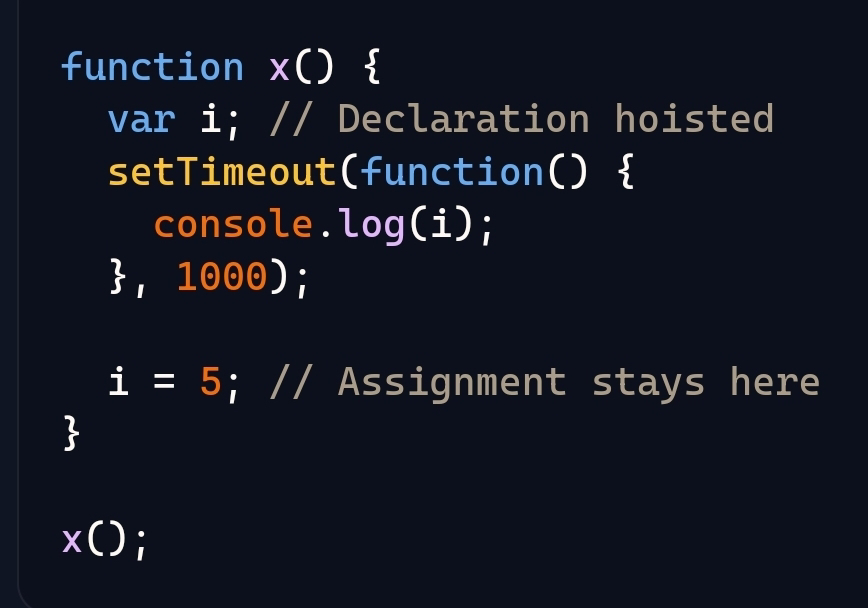
    The var i declaration is hoisted to the top of the function x, but the assignment i = 5 remains in its place.

    Hoisted Code: (Conceptual Representation):

    3 Execution Phase:

    The JavaScript engine executes the setTimeout function call, which schedules the console.log(i) to run after 1 second.

    It then assigns 5 to the variable i.

    Because of hoisting, the variable i is known to exist throughout the entire function x. This is why, when the setTimeout callback executes, it can access the value of i and logs 5.

    To summarize: When a function is called, its entire code isn't executed first before starting execution. Instead, variable and function declarations are hoisted to the top of their scope, and then the code is executed line by line. This process ensures that variable i is accessible within the setTimeout callback.


    Saturday, December 28, 2024

    Final Document

    1.Difference between state and props?
    Props
    are read-only attributes that are passed from a parent component to a child component. They allow data and event handlers to be sent to child components.
    State: Think of state like local variables in a function. They are declared and managed within the component.( or State: It's a way to keep track of information or data within a component. This information can change over time as the user interacts with the app or as data is updated.)

    (State:Each component can have its own state. This means the data stored in the state is only available to that specific component.)


    ---------------------------------------------Question:2-----------------------------------------------------

    2.When will you use state, context, and external state manager?

    (i). STATE:Local State: Use state for managing local component data. This is data that is specific to one component and doesn't need to be shared with other components.
    In Realtime used in: Simple Applications: For simple applications or components where the state is not deeply nested and doesn't need to be shared widely.
    (ii). CONTEXT:Global State: Use context for managing global state that needs to be accessible by many components at different levels of the component tree.
    In Realtime used in :Theming, Auth, Settings: Common use cases include theming, authentication, and user settings.

    (iii). External State Manager
    When to Use
    :

    • Complex State Management: Use an external state manager like Redux or MobX for managing complex state that involves deeply nested data, multiple sources of truth, or when you need advanced features like middleware.

    Large Applications: Ideal for large applications with a lot of state that needs to be shared across many components and modules.


    For State example refer  QA -1
    Below are the Context and Reducer code examples
    Example with Redux:


    Example with CreateContext


    ---------------------------------------------Question:3-----------------------------------------------------
    3. How do you decide when to split a component into subcomponents?

    Benefits of Splitting Components

    • Improved Readability: Smaller, focused components are easier to read and understand.
    • Reusability: Components can be reused across different parts of the application.
    • Maintainability: Easier to manage, debug, and test smaller components.

    Final Thoughts

    Splitting components should be driven by the need to simplify, reuse, and maintain your codebase. It’s a balance between having too many tiny components and overly large, complex ones. If it improves your code, it’s usually the right decision.

    I hope this helps clarify when to split a component into subcomponents! If you have more questions, feel free to ask!

    Guidelines for Splitting Components

    1. Single Responsibility Principle: Each component should ideally have one responsibility. If a component is doing too many things, consider splitting it.

      • Example: A component that handles both user authentication and displaying user profile information can be split into separate Auth and UserProfile components.

    2. Reusability: If a piece of UI or logic is used in multiple places, it should be a separate component.

      • Example: A Button component that is used in various forms throughout the app.

    3. Complexity Management: If a component grows too complex or large, making it difficult to understand, it's time to split it.

      • Example: A Dashboard component with multiple sections (charts, tables, notifications) can be broken down into Chart, Table, and Notification components.

    4. Separation of Concerns: Different concerns or functionalities should be handled by different components.

      • Example: A Form component that handles form submission logic and form field rendering can be split into Form and FormField components.

    5. Readability: If splitting a component makes the code easier to read and understand, it’s a good decision.

      • Example: A complex Header component with navigation, search bar, and user menu can be split into Nav, SearchBar, and UserMenu components.

    6. Logical Grouping: Group related logic and UI together in separate components.

      • Example: A ProductPage component with product details, reviews, and related products can be split into ProductDetails, ProductReviews, and RelatedProducts components.


    ---------------------------------------------Question:4-----------------------------------------------------
    4.How do you handle API and what techniques you'll use when you've call APIs upfront vs when it's called based on user action?

    Handling API calls in React involves choosing the right approach depending on whether the API should be called upfront (e.g., on component mount) or based on a user action (e.g., clicking a button). Let's break down both scenarios:

    1. Calling APIs Upfront

    When you need to fetch data as soon as a component mounts, you can use useEffect along with a data-fetching function. This is common for loading data required to render a component.

    2. Calling APIs Based on User Action

    When you need to fetch data based on a user action, such as clicking a button, you handle the API call inside an event handler.

    EXAMPLE FOR 1 AND 2


    • Techniques and Best Practices
    • 1. Error Handling: Always handle errors gracefully, providing feedback to the user.
      • Try/Catch: Use try/catch blocks to catch and handle errors.
      • Error States: Maintain an error state to display error messages.
    • 2. Loading States: Provide visual feedback while data is being fetched.
      • Loading Indicators: Show a loading spinner or message when fetching data.
    • 3. Data Caching: Use libraries like React Query or SWR for caching and synchronizing data.
    • 4.Debouncing/Throttling: Use debounce or throttle techniques for input-based API calls to prevent excessive requests. Refer below image for 3 & 4 point


    These practices help ensure smooth and efficient API calls, enhancing the overall user experience in your React applications.


    ---------------------------------------------Question:5-----------------------------------------------------

    5.Explain some realtime usecases for Lodash.Debounce?

    Lodash Debounce-is particularly useful in scenarios where you want to limit the frequency of events like user input or window resizing to improve performance and user experience. 
    /(Using lodash.debounce in these ways helps improve performance and user experience by preventing functions from being called too frequently in response to rapid events.)

    • Here are some typical usecases:

    Using lodash.debounce helps in controlling how often a function runs, especially during rapid actions like typing or scrolling. It waits a set time after the last action before running the function, preventing it from being called too often. This makes the app smoother and more efficient.